
Download 百度云密码自动填写器 – Browser Extensions, Chrome, Firefox, Opera, Google, Download, Cloud, Password, Auto Fill, Auto, Baidu, Cloud, Extract, Code, Utility, Free, Tool, PC, Windows, Mac
Overview
The 百度云密码自动填写器 is a browser extension designed to streamline the process of downloading files from websites that require Baidu Cloud extraction codes. It addresses the common frustration of manually entering passwords for multiple Baidu Cloud links, particularly on sites that host large volumes of shared content. This tool is ideal for users who frequently download files from community-driven platforms, such as movie forums, file-sharing sites, or resource hubs where Baidu Cloud links are prevalent.
By automating the input of download passwords, the software eliminates repetitive tasks, reduces human error, and enhances workflow efficiency. It is especially beneficial for individuals managing large collections of digital content, including media files, software packages, and educational resources. The developer, dy0825, has demonstrated ongoing commitment to improving functionality and compatibility through regular updates since its initial release in January 2017.
Real-world usage scenarios include batch downloading from forums like BTBT电影 or 天下足球网, where multiple Baidu Cloud links are posted simultaneously. Users can open several tabs, trigger the extension, and have passwords automatically filled without intervention. The tool also supports integration with download managers via right-click menu options, enabling seamless offloading of files to tools like Thunder or QQ旋风.
Key Features & Capabilities
- Automatic Password Detection – The extension scans web pages for Baidu Cloud download links and identifies associated extraction codes in real time.
- One-Click Auto-Fill – Once a compatible site is detected, a “百度云地址 密码:xxx” button appears, allowing users to auto-submit the password with a single click.
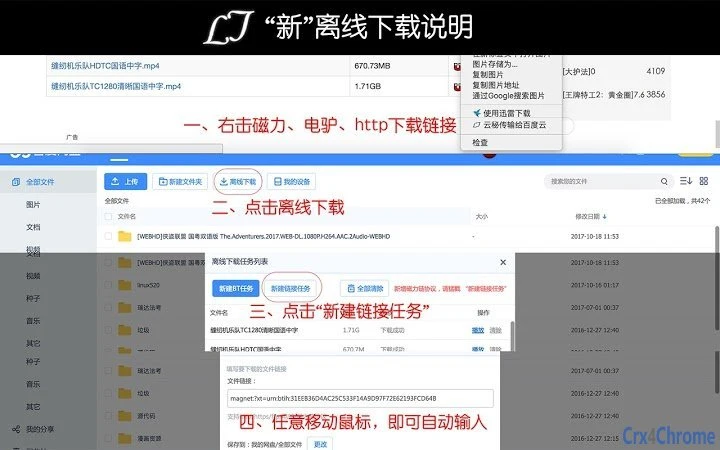
- Right-Click Integration – A dedicated context menu option, “云秘传输给百度云,” enables users to select a password or link and instantly send it to the Baidu Cloud download page.
- Protocol Support – Supports magnet links, eD2k addresses, and other download protocols, allowing direct offloading to supported clients such as Thunder and QQ旋风.
- Website Compatibility – Continuously updated to support new and existing platforms, including 百度首页, BTBT电影, 天下足球网, and other popular resource-sharing domains.
- Batch Processing – Allows multiple pages to be opened and processed simultaneously, with the extension detecting and filling passwords across all active tabs.
These features significantly reduce the time and effort required for managing Baidu Cloud downloads. For example, a user downloading 20 movie files from a forum can open all links at once, click the auto-fill button on each, and proceed without copying and pasting passwords manually. The right-click menu further enhances usability by enabling quick transfer of passwords from any text selection.
User Interface, Workflow & Performance
The extension features a minimalistic user interface, integrated directly into the browser’s toolbar. A small icon appears in the top-right corner, indicating its active status. When visiting a compatible website, the interface dynamically displays a “百度云地址 密码:xxx” button near the relevant download link, ensuring visibility without clutter.
Navigating through the workflow is straightforward: users open a page with a Baidu Cloud link, wait for the button to appear, and click it to trigger the auto-fill process. The extension operates silently in the background, requiring no configuration or complex setup. It does not interfere with standard browsing behavior, making it accessible even to non-technical users.
Performance observations are based on general software behavior patterns. The developer did not specify resource usage details. However, given its lightweight nature and function as a browser extension, it is expected to have minimal impact on CPU or RAM usage. Stability appears consistent across updates, with no reported crashes or conflicts in the provided changelog.
Compatibility & System Requirements
The 百度云密码自动填写器 is compatible with major desktop browsers, including Chrome, Firefox, and Opera. It supports both Windows and Mac operating systems, making it accessible to a wide range of users across different platforms. The installation size is 2.1 MB, indicating a lightweight footprint.
Exact system requirements were not listed. The developer did not provide additional system requirements. Compatibility information is limited to the supported browsers and OS platforms. Users should ensure their browser is up to date to maintain optimal functionality. The software version is 1.0.0, with updates released regularly since its initial launch in 2017.
Pros and Cons
Pros
- Automatically detects and fills Baidu Cloud passwords on compatible websites
- One-click submission reduces manual input errors and saves time
- Supports batch processing across multiple tabs
- Right-click menu enables quick transfer of passwords and links
- Compatible with popular download managers via protocol support
- Regular updates improve compatibility and fix bugs
- Free to download and use
Cons
- Only works on websites officially supported by the developer
- Does not function on all Baidu Cloud pages or third-party sites
- Browser-specific installation required (no universal desktop app)
- Privacy policy is available but lacks detailed data handling disclosures
- Performance impact on system resources not specified
FAQ Section
Is the 百度云密码自动填写器 compatible with all browsers?
The extension is confirmed to work with Chrome, Firefox, and Opera. Compatibility with other browsers has not been officially documented.
Is the software safe to use?
As a browser extension, it operates within the browser’s security sandbox. The developer has included a privacy policy, but detailed information on data collection or transmission is not publicly available.
How often does the software receive updates?
Updates have been released regularly since 2017, with improvements focused on compatibility, bug fixes, and new feature additions.
Does the software require a license or payment?
No, the software is completely free to download and use. There are no paid versions or subscription models.
Can I use this tool offline?
Yes, once installed, the extension functions offline. It only requires an active internet connection during the initial setup and when accessing Baidu Cloud pages.
Final Thoughts + CTA
The 百度云密码自动填写器 delivers a focused, effective solution for users burdened by repetitive password entry on Baidu Cloud download pages. Its ability to detect, auto-fill, and integrate with download managers significantly improves efficiency, especially in high-volume downloading scenarios. The consistent update history and broad compatibility with key platforms demonstrate the developer’s dedication to maintaining a reliable tool.
While it is limited to specific websites and functions as a browser extension rather than a standalone application, its simplicity and performance make it a valuable utility for frequent downloaders. It is particularly suited for users managing large digital libraries or engaging in regular file-sharing activities.
Download 百度云密码自动填写器 now to simplify your Baidu Cloud download workflow and reclaim your time.







